Managed vs Unmanaged PoE Switches: How to Choose
Compare managed and unmanaged PoE switches for South African camera, Wi-Fi and industrial networks, including VLANs, diagnostics and redundancy.
By Maxsol Team

The right choice in a managed vs unmanaged PoE switch comparison depends on how much control, visibility and network separation the site requires. An unmanaged PoE switch is often the sensible option for a small, self-contained camera or wireless installation. A managed PoE switch becomes worthwhile when you need configurable VLANs, remote diagnostics, traffic priorities, fibre uplinks, resilience features or a documented network design.
Managed hardware is not automatically better for every project. It adds setup work and requires someone to configure and maintain it properly. For a simple network with a limited number of devices and one trusted local network, an unmanaged switch can be easier to commission and support.
What unmanaged switches provide
An unmanaged PoE switch forwards traffic automatically once devices are connected. It supplies Power over Ethernet (PoE) to compatible endpoints, such as IP cameras, wireless access points, VoIP phones or network bridges, while carrying data over the same Ethernet cable.
Its main benefit is simplicity. There is usually no web interface, command line or network management platform to configure. An installer can connect the uplink, attach PoE devices, check link and power indicators, and complete a small deployment quickly.
Unmanaged switches are often well suited to:
- Small CCTV systems where all cameras connect to one recorder or local network.
- A dedicated point-to-point wireless link with a few access points or CPE devices.
- Temporary or low-complexity installations.
- Networks where there is no requirement to split traffic into separate security, guest, office or operational segments.
- Projects with no practical need for remote switch-level monitoring.
That simplicity comes with limits. An unmanaged switch cannot normally show port traffic history, identify a bandwidth-hungry endpoint, apply scheduled PoE power cycles, configure tagged VLANs or provide detailed fault alerts. If a camera intermittently drops offline, the installer may need to visit site and work through cable, power, device and uplink checks manually.
Useful modes are not the same as full management
Some unmanaged PoE switches include physical DIP-switch modes that help with specific installation needs. For example, an extension mode may support longer cable runs in exchange for lower data rates, while isolation mode may restrict communication between certain access ports. A watchdog mode may attempt to recover a connected PoE device that stops responding.
These functions can be valuable, particularly in camera networks, but they should not be mistaken for full managed switching. DIP-selectable isolation is not a replacement for designing and administering an IEEE 802.1Q VLAN scheme across switches, routers and firewalls.
What management adds
A managed PoE switch gives the network team a configuration and monitoring layer. Depending on the switch model, this may be accessed through a web interface, SNMP, a controller or another management method.
The practical benefit is not simply having more settings. It is being able to make the network intentional: which devices can communicate, which traffic receives priority, how faults are identified, and what happens when a link fails.
Common managed-switch capabilities include:
- Port monitoring: View link state, negotiated speed, traffic counters and errors to help isolate faults.
- PoE oversight: Check power delivery status per port where supported, and manage PoE policies where available.
- VLAN configuration: Separate camera, staff, guest Wi-Fi, access-control and operational traffic.
- Quality of Service (QoS): Prioritise latency-sensitive traffic, such as voice or selected operational services, when the network design calls for it.
- Discovery and topology support: Features such as LLDP can help identify directly connected equipment and support clearer documentation.
- Multicast controls: IGMP Snooping can limit unnecessary multicast traffic on networks using compatible multicast services.
- Fibre and uplink flexibility: Many managed industrial models include SFP slots, allowing the correct compatible fibre transceivers and link design to be selected.
- Resilience functions: Certain managed switches support ring or failover mechanisms intended to reduce disruption after a path failure.
Management does introduce responsibility. Default credentials must be changed, access should be restricted, configurations should be recorded and backed up where possible, and firmware maintenance needs a planned approach. A poorly configured managed switch can cause more disruption than a properly deployed simple switch.
Management matters most when a fault has a cost
A remote solar-powered camera pole, perimeter monitoring system or distributed Wi-Fi network can be expensive and slow to visit for fault-finding. In these environments, port status and diagnostics may justify a managed switch even if the total number of endpoints is modest.
Conversely, a switch sitting beside a recorder in a secure comms cabinet may not require extensive management if it serves only a few cameras and the network is intentionally isolated.
VLAN monitoring and redundancy questions
Before specifying a switch, decide whether the requirements are genuine design needs or merely features that sound useful. These questions make the distinction clearer.
Do you need VLANs, or only device isolation?
A VLAN divides a physical network into logical broadcast domains. Proper VLAN deployment requires coordination between the switch, uplinks, router or firewall, and sometimes wireless access points or network video recorders.
VLANs are useful when, for example:
- Cameras must be separated from the office LAN.
- Guest Wi-Fi must not reach business devices.
- Multiple tenants, departments or security zones share network infrastructure.
- Network policies need to be enforced at a firewall between segments.
- Broadcast traffic needs to be contained as the network grows.
For a small camera system with one recorder and no connection to the corporate LAN, full VLAN configuration may add little value. For a mixed site carrying business devices, CCTV, access control and Wi-Fi, VLAN planning is usually more important.
Ask these questions:
- Which devices need to communicate with one another?
- Which devices must be prevented from communicating directly?
- Where will inter-VLAN traffic be routed and secured?
- Are uplink ports configured to carry the necessary tagged VLANs?
- Can the recorder, controller or management workstation reach the correct network segment?
A common mistake is enabling a VLAN-related setting on one switch without planning the complete path. This can make devices unreachable rather than more secure.
What kind of monitoring will actually help?
Basic LEDs can confirm power and link status at the cabinet. Managed monitoring is more useful when the team needs answers without immediately travelling to site:
- Is the port down, or is the device powered but not passing traffic?
- Is the uplink saturated?
- Are there interface errors suggesting a cable or termination problem?
- Did a link flap repeatedly?
- Is a particular endpoint creating unexpected traffic?
Monitoring does not repair a poor cable run, inadequate power design or failed endpoint. It does, however, reduce guesswork and can guide the first response.
Is redundancy needed, and at which layer?
Redundancy must be defined precisely. A second network path does not protect against a power outage, and a battery-backed power source does not protect against a damaged fibre route.
Consider the failure you are trying to address:
| Requirement | Questions to ask | Potential switch consideration |
|---|---|---|
| Uplink path resilience | Is there a physically separate return path, and are connected switches compatible with the chosen recovery method? | A managed switch with supported ring or redundancy features may be appropriate. |
| Fibre connection flexibility | Does the site need fibre between cabinets, buildings or remote equipment? | Check SFP slot count, transceiver type, fibre type, distance and link speed. |
| Power continuity | What must remain operational during an interruption, and for how long? | Assess the whole power system, connected load and backup source—not the switch alone. |
| Endpoint recovery | Do cameras or radios occasionally need a power reset? | Check whether the switch offers an appropriate watchdog or PoE control function. |
| Fault visibility | Who will diagnose the issue, and can they access the switch securely? | Managed monitoring may reduce site visits. |
Do not assume that a switch feature creates an end-to-end redundant network by itself. A ring protocol such as ERPS needs a compatible topology and correct configuration across the relevant network devices. Equally, an integrated UPS module requires a load and runtime assessment; its presence alone does not state how long a site will operate during an outage.
When a simple camera network can remain unmanaged
A simple camera network can remain unmanaged when it is small, physically contained and operationally separate from more complex business traffic. This is often a practical choice for a dedicated recorder-and-camera installation where all endpoints are local and the installer can access the cabinet easily.
An unmanaged PoE switch is normally a reasonable fit where:
- The cameras connect to one NVR or a single dedicated surveillance network.
- There is one uplink and no requirement for alternate paths.
- The site does not need configurable VLANs.
- There are no shared office, guest or tenant networks on the same switching infrastructure.
- The total PoE load has been calculated with adequate headroom.
- Port-level traffic monitoring and remote configuration are not required.
- The installer can identify faults using physical access and normal commissioning checks.
For this type of deployment, the priority should be good fundamentals:
- Calculate the power budget. Add the maximum expected power draw of every PoE endpoint, including cameras with heaters, illuminators or PTZ movement where applicable. Compare this with the switch’s total PoE budget and any per-port limits.
- Confirm cable paths and length. Use suitable cable, sound terminations and realistic route lengths. Do not rely on an extension mode without understanding its speed trade-off and suitability for the device.
- Plan the uplink. Ensure the NVR, router or upstream switch has sufficient capacity for the combined camera traffic.
- Label everything. Record camera location, switch port, cable identifier and power source. This is especially valuable when an unmanaged switch offers limited diagnostics.
- Test normal and adverse conditions. Confirm live view, recording, night operation and any expected higher-power camera functions before handover.
An unmanaged network should be reconsidered when it begins to expand. Adding wireless access points, office users, additional cabinets, fibre links or remote sites can turn an originally simple CCTV network into a shared operational network that benefits from management and segmentation.
Compare approved Maxsol examples
The following examples illustrate how switch type and installation context can guide selection. They are not a substitute for confirming the current product documentation, endpoint compatibility and project-specific power requirements.
| Example | Management approach | Relevant verified features | Best considered for |
|---|---|---|---|
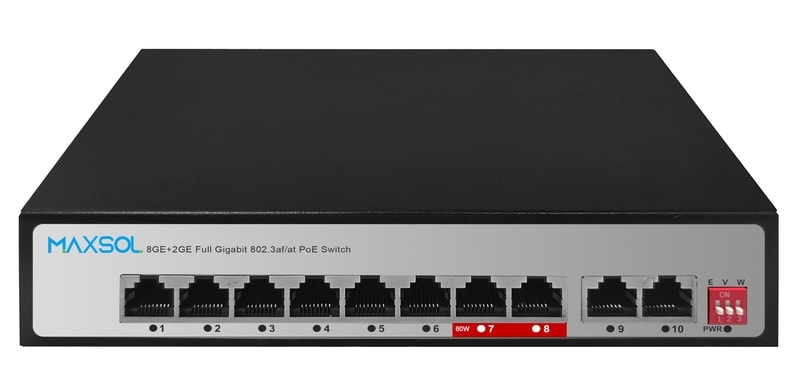
| PS1802G | Unmanaged | Eight Gigabit PoE ports with DIP-selectable Extend, VLAN isolation and AI watchdog modes | Straightforward PoE deployments where physical-mode controls are sufficient |
| PS2802SFG-I-BT | Managed industrial DIN-rail | Eight Gigabit Ethernet ports, two SFP ports, web and SNMP management, VLAN, QoS, LLDP, IGMP Snooping, ERPS and static routing | Industrial or distributed systems needing configuration, diagnostics, fibre options or resilience planning |
| SBOX2802SFG-I | Layer 2 managed smart Ethernet box | Eight Gigabit PoE ports, two Gigabit SFP slots, IP65 protection and a built-in 240W UPS power module | Outdoor or protected-box installations requiring managed networking and integrated power-system consideration |
PS1802G: uncomplicated PoE switching with selectable modes
The PS1802G unmanaged eight-port Gigabit PoE switch is relevant to smaller deployments where easy installation is the main priority. Its DIP-selectable Extend, VLAN isolation and AI watchdog modes may help address common camera-network needs without requiring a managed interface.
The VLAN isolation mode should be evaluated as device-port isolation rather than assumed to provide a full configurable VLAN architecture. Confirm how the selected mode affects required communication between cameras, the recorder, an uplink and any service laptop before commissioning.
PS2802SFG-I-BT: managed DIN-rail switching for controlled networks
The PS2802SFG-I-BT managed DIN-rail industrial PoE switch offers web and SNMP management alongside VLAN, QoS, LLDP, IGMP Snooping, ERPS and static routing features. It has eight Gigabit Ethernet ports and two SFP ports.
This profile suits a project where the switch must do more than pass traffic: perhaps separating systems with VLANs, supporting a fibre uplink design, monitoring ports, or participating in a planned resilient topology. ERPS is relevant only where the wider network has been designed and configured to use it correctly.
SBOX2802SFG-I: managed switching in an IP65 smart box
The SBOX2802SFG-I managed industrial smart Ethernet box combines eight Gigabit PoE ports, two Gigabit SFP slots and Layer 2 management in an IP65-protected enclosure. It also includes a built-in 240W UPS power module.
This combination may be useful when network equipment and power considerations are being brought together in an outdoor or site-edge installation. Confirm enclosure placement, cable entry, thermal conditions, power source, total connected load and the required backup duration as part of the complete site design.
Decision checklist
Use this checklist to decide whether a managed or unmanaged PoE switch fits the project.
Choose an unmanaged PoE switch when
- The network is dedicated, small and uncomplicated.
- Devices do not need configurable network segmentation.
- One local uplink path is acceptable.
- Site access for troubleshooting is straightforward.
- Basic status indicators and physical-mode controls meet the support requirement.
- The PoE budget, cable distances and uplink capacity have been checked.
Choose a managed PoE switch when
- You need configurable VLANs across a wider network.
- Different device groups require separation or traffic policies.
- Remote port diagnostics will materially improve support.
- The system uses fibre uplinks or multiple connected cabinets.
- QoS, LLDP, IGMP Snooping or similar network controls are part of the design.
- A compatible redundant topology is required.
- The project is likely to grow beyond a self-contained camera system.
Confirm before placing an order
- Number of PoE and non-PoE devices, including future expansion.
- Maximum total PoE demand and maximum power requirement per endpoint.
- Ethernet cable type, route length, surge and protection requirements.
- Uplink medium, speed, connector and any required SFP transceivers.
- Need for VLANs, QoS, multicast handling, monitoring or redundancy.
- Installation environment, enclosure protection and power arrangement.
- Who will configure, document, secure and maintain a managed switch.
The best managed vs unmanaged PoE switch decision is the one that meets the site’s actual operational requirements without adding avoidable complexity. Compare the linked Maxsol models against your required port count, connected load, cable distance, power arrangement, environment and management needs before specifying the final design.